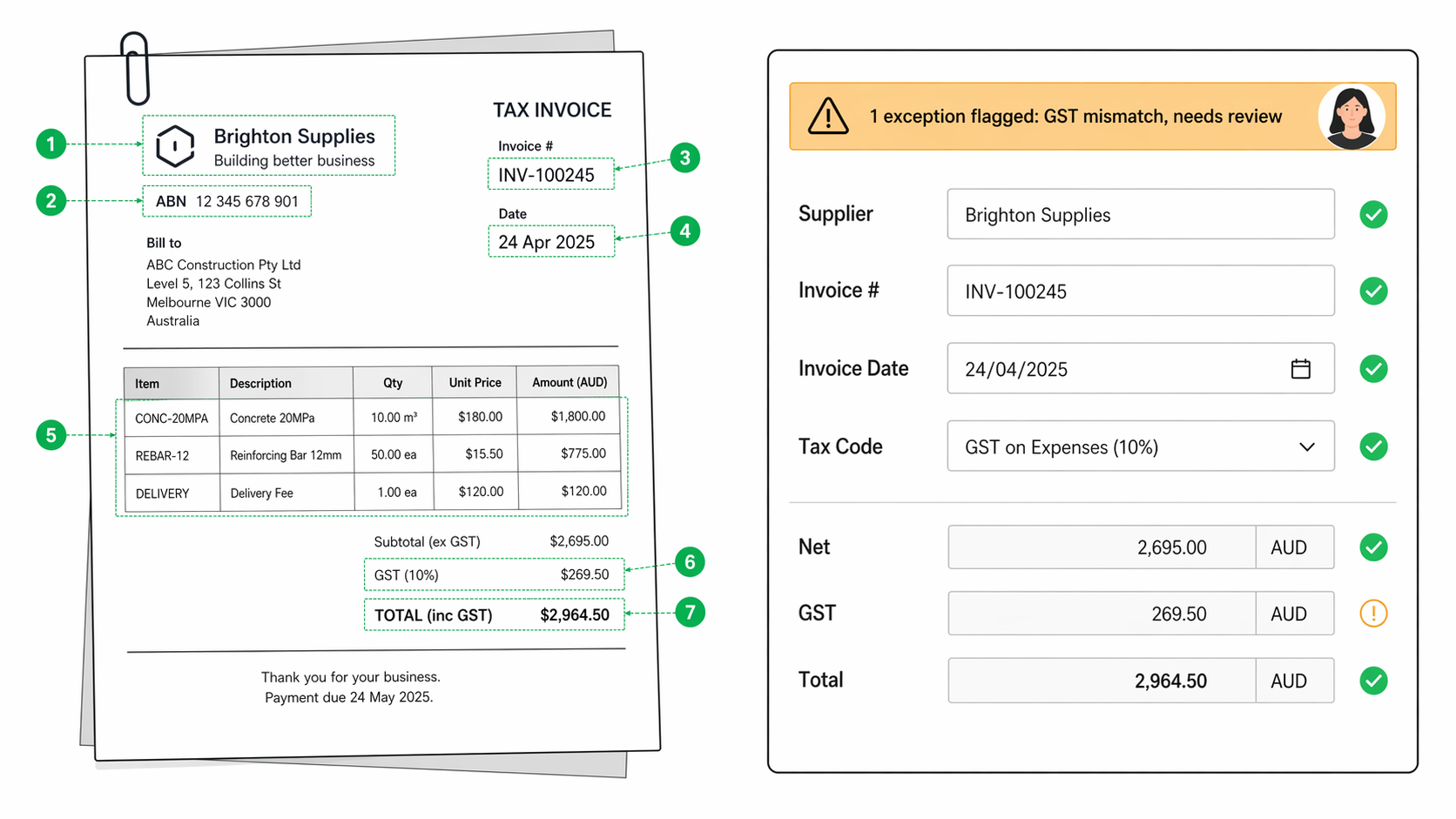
Document & Invoice Automation uses language and vision models to read supplier invoices, claims forms, delivery dockets, and contracts, extract the fields that matter, and post them straight into your ERP or claims system. A human only sees the exceptions. Built for mid-market AP, claims, and contracts teams who are drowning in PDFs.
You are paying an AP clerk $75,000 a year to open PDFs. Every week. That clerk spends most of the day retyping the same seven fields from a supplier invoice into MYOB, Xero, NetSuite, or Pronto. On the good days they close 120 invoices. On the bad days a supplier sends a scan of a scan and the whole thing slows down.
Claims assessors do the same work in a different uniform. Damage report arrives as a PDF. They read it, type the extracts into Guidewire or Duck Creek, and move on. Contracts administrators do it with subbie agreements. Council officers do it with development applications. The cost is hidden because nobody books it as a line item, but it is the single biggest drag on the back office of every mid-market insurer, builder, council, and logistics operator we meet.
The work is boring, error-prone, and hard to scale. When volume spikes you either pay overtime, let the backlog grow, or miss the early-payment discount. None of those options are good.
Inside your business it looks like this. A supplier emails an invoice to ap@yourcompany. The system reads it, pulls out supplier name, ABN, invoice number, date, line items, GST, and totals, matches it to the PO in NetSuite, and posts it. The AP clerk sees a queue of three exceptions for the day: one GST mismatch, one unknown supplier, one line item that does not reconcile. They fix those and go home on time.
Claims runs the same pattern. PDF damage report hits the shared inbox. The system extracts claimant details, policy number, incident date, damage description, and estimated costs. It lands in Guidewire with a confidence score. The assessor opens only the ones flagged for review.
We catalogue your document types, sample 200+ real examples, and agree which fields matter for each one.
We stand up a processing pipeline that reads email inboxes, shared drives, or scanner folders where documents arrive today.
Vision and language models extract the structured fields, with a confidence score attached to each value.
High-confidence records post straight into your ERP or claims system through the native API or flat-file import.
Low-confidence records land in a review queue with the original document and the proposed extraction side by side.
Every human correction feeds back into the model, so the confidence threshold covers more of the volume each month.
An audit trail records which document was processed, what was extracted, what the human changed, and who approved it.

Being honest about where the AI works and where it does not is part of the sell. This table goes on the page.
| Document type | How we handle it | Confidence |
|---|---|---|
| Supplier invoices (PDF, scanned, emailed) | Extract, match to PO, post to ERP | Strong |
| Delivery dockets | Extract line items, reconcile against receipted quantity | Strong |
| Expense receipts | Extract vendor, date, amount, GST, category | Strong |
| Simple contracts (standard templates) | Extract counterparty, term, value, renewal date | Strong |
| Insurance claim forms (digital) | Extract claimant, policy, incident, damage, estimate | Strong |
| Timesheets | Extract worker, hours, cost code, approver | Strong |
| PO acknowledgements | Extract PO reference, confirmed price, confirmed date | Strong |
| Complex multi-party contracts with legal nuance | Human reviews first pass | Needs a human |
| Handwritten forms in poor-quality scans | Human reviews first pass | Needs a human |
| Documents in a language we have not trained for | Human reviews first pass | Needs a human |
| Forms with non-standard layouts we have not seen | Human after first 20-50 samples, then AI takes over | Trained in |
If you send us 20 samples of a document type we have never seen, we will tell you honestly whether it sits in column one, column two, or column three before you commit to the build.
Manual keying drops by most of the volume inside 90 days. AP and claims staff get their week back for exception handling, supplier management, and the judgement work they were hired for.
Invoices post the same day they arrive. Early-payment discounts that used to slip through the cracks get captured. Late-payment penalties disappear from the ledger.
Within 90 days, extraction error rates fall below what a fatigued clerk produces at 4pm on a Friday. Every error is traceable to a specific document and a specific field, so fixing them is quick.
Every decision logged. Every correction logged. Every approval logged. When your auditor asks why that invoice was posted at that GST rate, the answer is one click away.
Production-ready AI agents, chatbots, and multi-agent systems, built senior-led end-to-end.
Learn morePredictive models, recommendation systems, forecasting, and MLOps, delivered with a ruthless ROI focus.
Learn moreClose the gap between what your data knows and what your business does. The architecture from insight through decision to action.
Learn moreHandle supplier exceptions at a scale previously reserved for the top of town.
Days to hours
exception response time
Ask your business a question. Get a cited answer before the meeting ends.
Minutes
from question to cited answer, across 29 sites
A copilot for techs to ask questions of your SOPs, product bulletins, and recall notices, and get answers tailored to the job in front of them.
31 min
average time returned to each field worker per shift
30-minute call, no slides, no obligation. We'll tell you plainly whether this is the right fit for what you're trying to do.
Cookie preferences
We use essential cookies to run the site. With your permission, we also use analytics cookies to understand what content helps visitors make better data and AI decisions.